Getting Started with Grindly
Your complete guide to turning screen time into an RPG — skills, loot, boss fights, crafting, and more.
What is Grindly?
Grindly is a cross-platform desktop app (Windows and macOS) that lives in your system tray or menu bar and silently watches which apps you use. Every minute you spend coding, designing, gaming, or communicating earns XP in a matching skill — turning your real daily work into an RPG character sheet.
There is no goal to distract you from real work. Grindly rewards you for doing it. The longer you focus, the more XP you earn, the better loot you unlock, and the harder bosses you can fight.
Install & Launch
Getting Grindly running takes under two minutes. No account required to start tracking.
Windows
- 1 Download the .exe installer from the button above.
- 2 Run the installer. Windows will show a red "Windows protected your PC" SmartScreen prompt — see the note below for what to click.
- 3 Grindly launches and appears in your system tray (bottom-right corner of your taskbar). Look for the orange/gold G icon.
- 4 Click the tray icon to open the main window. You'll land on the Home screen showing your active session.
- 5 Optional: Create a free account (Settings → Account) to unlock leaderboards, friends, cloud sync, and the marketplace.
macOS
- 1 Download the .dmg file from the button above.
- 2 Open the .dmg and drag Grindly to your Applications folder.
- 3 On first launch macOS may block it — go to System Settings → Privacy & Security and click "Open Anyway".
- 4 Grindly appears in your menu bar (top-right). Click the icon to open the main window.
Grindly is an indie app and we haven't paid for an OS-level code signing certificate yet. Windows SmartScreen and macOS Gatekeeper flag every unsigned installer with a scary red prompt — even when the app is safe. This is the OS being cautious, not a virus.
On Windows:
- You'll see a red panel: "Windows protected your PC".
- Click the small "More info" link.
- A new "Run anyway" button appears in the bottom-right — click it.
- The installer proceeds normally.
On macOS:
- You'll see "Grindly cannot be opened because the developer cannot be verified".
- Open System Settings → Privacy & Security, scroll to the bottom.
- Click "Open Anyway" next to the Grindly notice.
- Confirm in the dialog — Grindly launches.
A signed build is on the roadmap; once we ship it, the warning will go away on its own.
Activity Tracking
Grindly uses a lightweight native subprocess (PowerShell on Windows, a Swift helper on macOS) to read the active foreground window every ~1.5 seconds. It never reads your screen contents, keystrokes, or any data inside your apps — only the process name and window title.
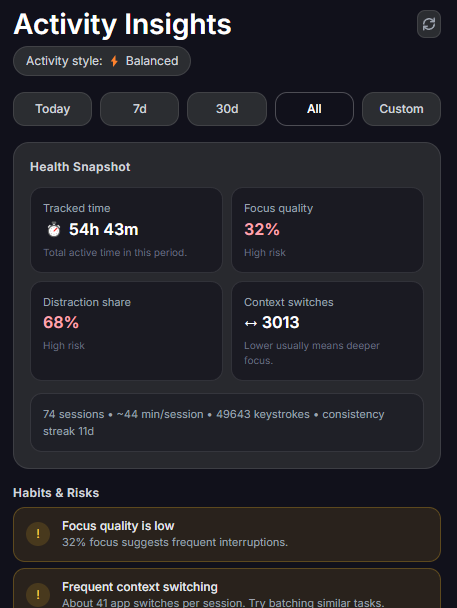
The Stats page shows a complete history of every session broken down by skill and day. You can see exactly how much time went to each category.
Sessions start automatically when you begin working and end after 5 minutes of inactivity. Each completed session awards XP proportional to the time spent.
Skills & XP
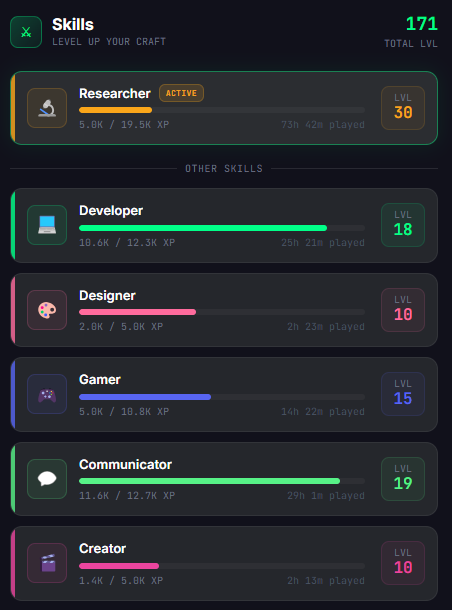
Grindly has 14 skills across two categories:
Passive Skills — earned automatically based on which apps you use:
Active Skills — earned inside Grindly:
Each skill goes from Level 1 to 99 using a non-linear XP curve — early levels are fast, late levels require serious grind. At Level 99 you can prestige for bonus XP multipliers.
Loot & Chests
When a session ends, Grindly awards a loot chest based on how long and how focused your session was. Open it to receive random gear, materials, potions, or seeds.
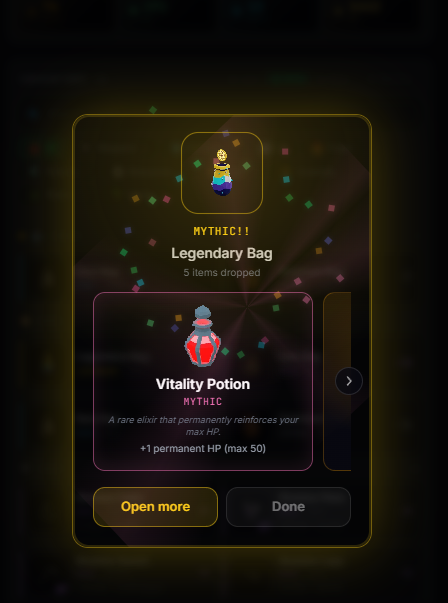
There are 4 chest tiers:
- ■ Common — short sessions (~15 min). Basic gear and materials.
- ■ Rare — medium sessions (~45 min). Better gear, more materials.
- ■ Epic — long sessions (~2h). Epic items, crafting materials, seeds.
- ■ Legendary — marathon sessions (~4h+). Legendary/mythic gear, rare materials.
Inventory & Gear
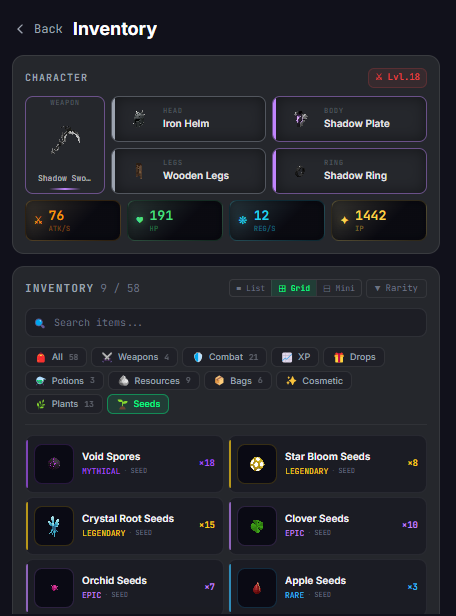
Open the Inventory tab to manage your collected items. Your character has 5 gear slots:
- △ Head — helms, crowns, cosmetic headgear
- ● Body — plates, robes, armor
- ◇ Legs — greaves, trousers
- ♢ Ring — rings, amulets, pendants
- ⚔ Weapon — swords, daggers, blades
Each equipped item contributes ATK, HP, and HP Regen to your combat stats. Better gear = stronger Arena performance.
Item Power (IP) is a single number summarizing an item's strength. It's calculated from its rarity and perks. Use IP to quickly compare upgrades.
Arena & Bosses
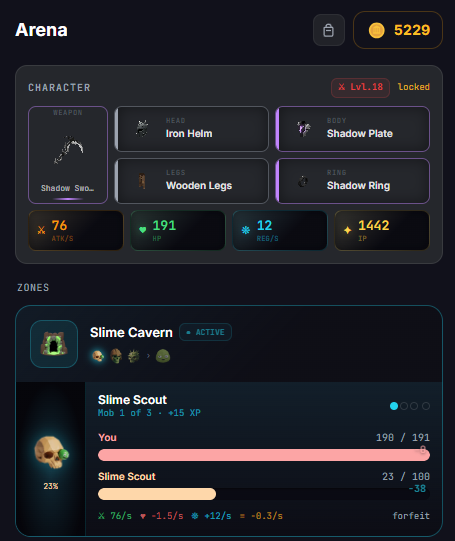
The Arena tab is where your gear gets tested. Fight through 8 progressive zones, each with normal mobs and a zone boss.
Combat is turn-based auto-battle. Your ATK, HP, and HP Regen stats (from equipped gear) determine how the fight plays out. You win by killing the boss before your HP runs out.
Defeating bosses awards:
- XP Warrior XP for your combat skill
- 🌟 Gold used in the marketplace
- 🏦 Materials used in crafting recipes
Zones unlock progressively: Slime Cavern → Goblin Outpost → Wild Forest → Orc Stronghold → Troll Bridge → Dragon Lair → Shadow Crypt → Celestial Spire. Each zone is harder but drops better materials.
Crafting
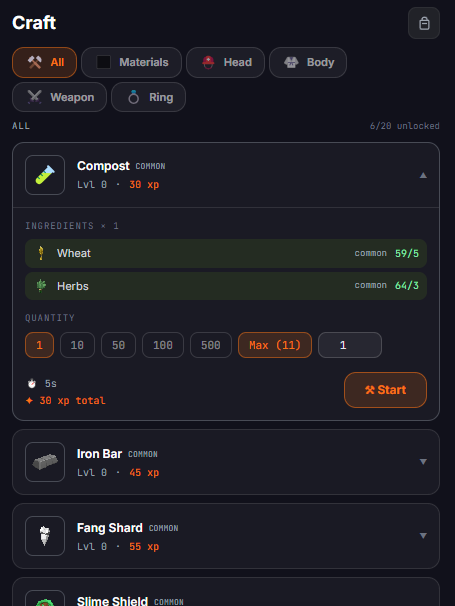
The Craft tab lets you combine materials from farming, arena, and chests into powerful gear, potions, and special items.
Recipes require:
- LVL A minimum Crafter level to unlock
- MAT Specific materials in your inventory
- T Real time to craft (5s to 2 hours)
- 🌟 Optional gold cost for advanced recipes
Crafting awards Crafter XP. Higher Crafter level unlocks more powerful recipes including the endgame Lich Set and Titan Set.
Marketplace
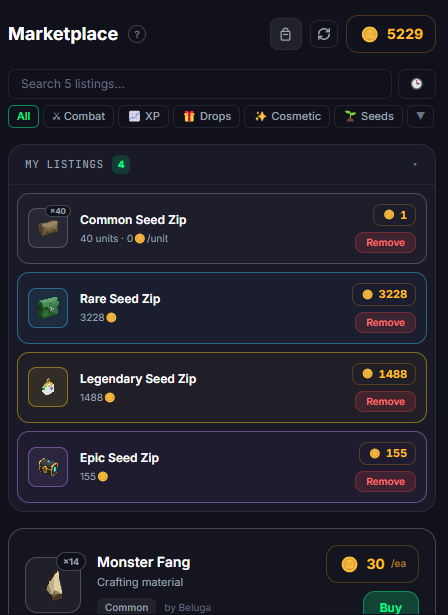
The Marketplace is a player-to-player trading system. List items you don't need, buy items you do. Prices are set by players and governed by supply and demand.
- 1 Tap an item in your inventory and select "List on Market" to create a listing.
- 2 Set your price in gold and quantity.
- 3 Other players browsing the Marketplace can buy your listing instantly.
- 4 You can hold up to 5 active listings at once. Listings expire after 7 days.
Hover over the price sparkline on any item to see recent sale history — useful for pricing your items competitively.
Pro Tips
These are the things veteran Grindly players wish they'd known at the start:
- 💡 Equip your best gear before Arena runs. Your stats are read at the start of combat — always check your inventory first.
- 💡 Farm during long work sessions. Plant seeds before a big coding session — they'll be ready to harvest by the time you're done.
- 💡 Craft potions early. ATK and HP potions give a temporary combat boost that can make the difference in tough boss fights.
- 💡 Check the Marketplace before crafting. Sometimes it's faster and cheaper to buy materials than farm them yourself.
- 💡 Prestige at Level 99. Prestiged skills earn a permanent XP multiplier. Prestige your most-used skill first for maximum benefit.
- 💡 Use Focus Mode. Enable Focus Mode (tray right-click menu) to pause tracking during breaks — XP only counts when you're actually working.
- 💡 Connect your account. Account creation unlocks the friends list, global leaderboard, and cross-device cloud sync.